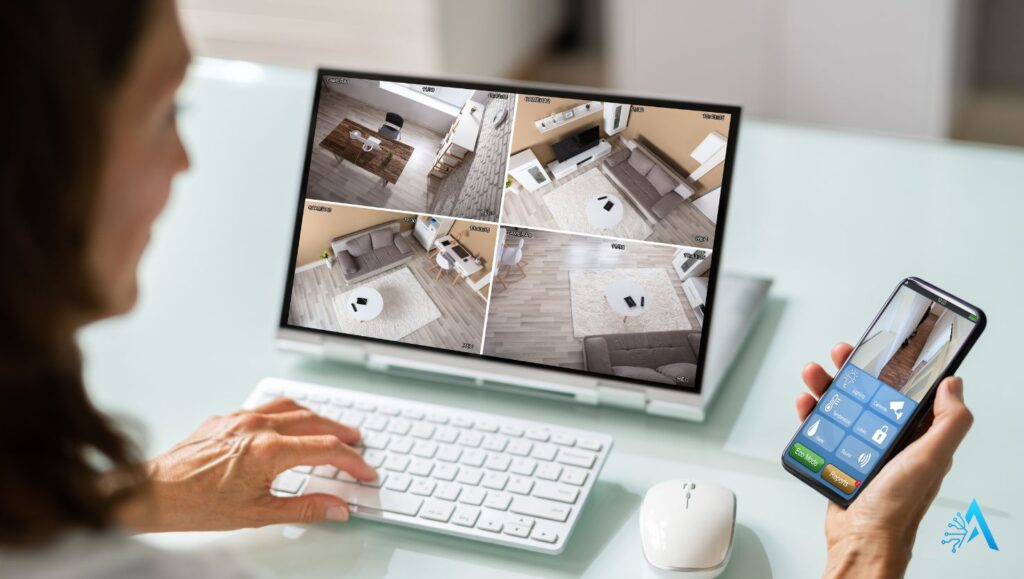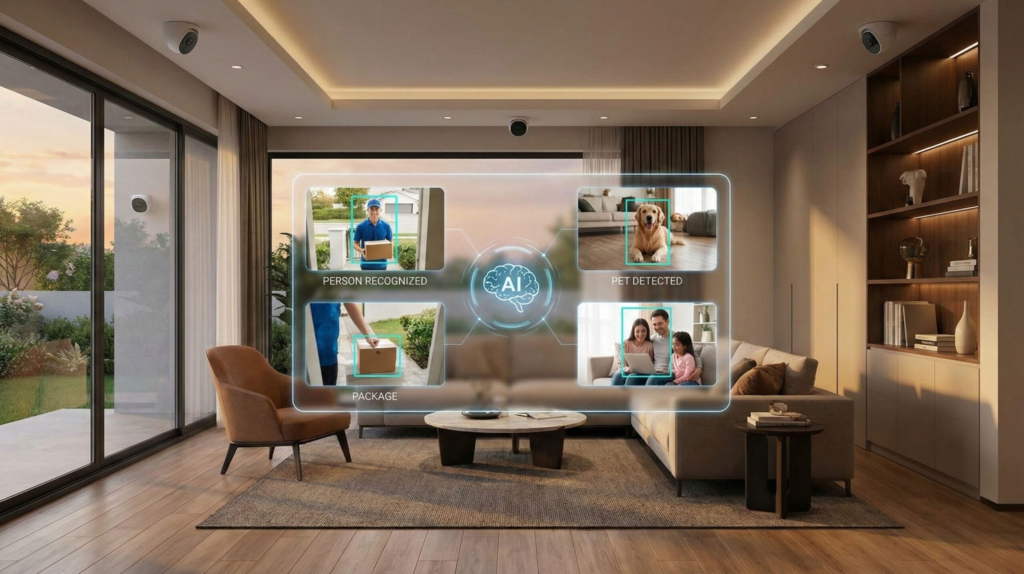
AI security camera in smart home setup with facial recognition interface (2025)

Best AI Security Cameras – What to Know Before You Buy

📅 Published on: July 13, 2025

📌 Table of Contents

Disclosure:
This post may contain affiliate links. If you purchase through them, we may earn a small commission — at no extra cost to you. This helps support our research and keeps AI Digital Space running. Thank you!

1. Introduction – Why AI Security Cameras Are a Big Deal in 2025

In 2025, AI security cameras have become one of the smartest investments for your home — and one of the most misunderstood. Whether you’re trying to keep an eye on your front door, your pets, or your deliveries, these devices are no longer just motion detectors. They’re equipped with facial recognition, real-time alerts, and even predictive analysis.

But how do you choose the right one when every brand claims to be “smart”? And more importantly — what are these cameras actually doing with the data they capture?

According to a recent Wired article on home surveillance tech, consumers are starting to care less about the hardware, and more about how intelligent and transparent the software is. AI has shifted the conversation from “does it work?” to “who’s watching who?”

That’s exactly why we put together this guide on the best AI security cameras of 2025 — to help you cut through the noise, find the right device for your home, and know what to look for before you buy.

We’ll walk through the top models available this year, break down what makes them smart, and offer real insights on things like privacy, cloud storage, and false detection alerts.

Let’s take a closer look at the tools keeping your home safer — and what’s really going on behind the lens.

AI security cameras monitoring a smart home interior with multi-view live feeds on a desktop screen and mobile app

2. Top AI Security Cameras Reviewed (2025)

Choosing the right AI security camera today means thinking beyond just video quality or brand reputation. In 2025, what truly matters is how well the AI actually workscan it recognize a familiar face? Does it reduce false alerts? Can it integrate smoothly with your smart home setup?

The best AI security cameras don’t just record footage. They understand what’s happening, helping you focus on real events instead of constant notifications.

To make your decision easier, we’ve reviewed the top AI security cameras of 2025, focusing on AI performance, ease of use, smart features, and privacy controls. Whether you’re looking for something sleek for indoor monitoring or rugged for outdoor protection, there’s an AI-powered security camera designed to fit your needs.

Before diving into the individual reviews, here’s a quick comparison table to help you spot the key differences at a glance.

Camera Best For Key AI Features Price Buy
Google Nest Cam (Battery) Indoor & outdoor use Person detection, familiar face alerts 💲💲💲 View deal
Arlo Pro 5S Advanced smart homes AI motion alerts, color night vision 💲💲 View deal
TP-Link Tapo C425 Budget-friendly AI Smart tracking, activity zones 💲 View deal
Ring Spotlight Cam Plus Outdoor + Alexa integration AI detection, spotlight alerts 💲💲💲💲 View deal

3. Detailed Reviews – Best AI Security Cameras of 2025

Now that you’ve seen the top models at a glance, let’s look more closely at what each of these AI security cameras actually offers. Features like real-time face recognition, smart alerts, and cloud-based AI processing can vary significantly from one brand to another — and those differences can directly shape your day-to-day experience.

Some AI security cameras are better at identifying familiar faces, while others focus on reducing false alerts or offering deeper smart home integrations. Understanding these distinctions helps avoid paying for features you may never use.

We’ve reviewed every camera for its AI capabilities, ease of use, pricing, and how well it integrates into a smart home setup. This way, you can clearly see which AI-powered security camera is actually worth your money — not just on paper, but in real life.

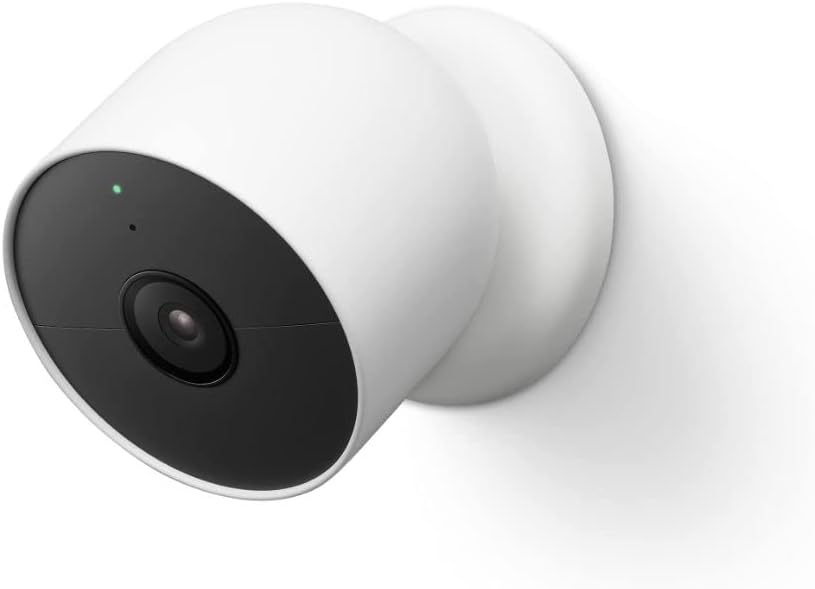
1. Google Nest Cam (Battery)

Type: AI-Powered Indoor/Outdoor Camera
AI Features: Person detection, familiar face alerts, activity zones, cloud-based AI
Price: ~$120

Why It’s a Top Pick
The Google Nest Cam (Battery) stands out for its sleek design, strong AI features, and flexible indoor-outdoor setup. It automatically detects people, animals, and vehicles, helping reduce false alerts. Its integration with the Google Home ecosystem makes it ideal for users who want real-time notifications, voice control, and video history in one app.

What People Say
Users praise the intuitive app, reliable motion alerts, and sharp video quality. The familiar face feature is a favorite, alerting you only when someone unfamiliar is spotted. While some features require a Nest Aware subscription, many find the upgrade worth the added context and cloud storage.

Key Insights
✅ Pros ✔️ Smart alerts reduce false alarms
✔️ Familiar face recognition with Nest Aware
✔️ Works seamlessly with Google Home and voice assistants
✔️ Flexible indoor/outdoor mounting with strong battery life
⚠️ Cons ✘ Advanced features require Nest Aware subscription
✘ Cloud-reliant — limited offline functionality
🔍 Ethical Insight The Google Nest Cam uses facial recognition and cloud-based AI. Users should be aware of data storage practices and review Nest’s privacy terms to understand what’s retained and shared.
Explore Google Nest Cam

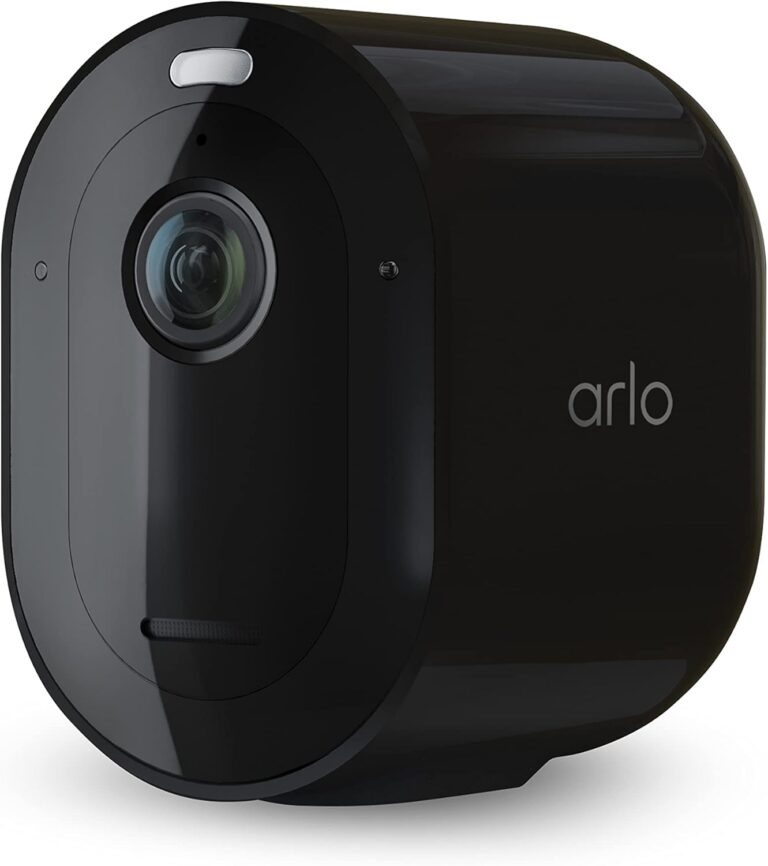
2. Arlo Pro 5S

Type: AI-Powered Outdoor Security Camera
AI Features: AI motion detection, person/animal/vehicle alerts, color night vision, dual-band Wi-Fi
Price: ~$89

Why It’s a Top Pick
The Arlo Pro 5S is built for serious outdoor security. Its 2K video quality, built-in spotlight, and color night vision provide excellent visibility even at night. What makes it shine in 2025 is its smart alert system — the camera uses AI to recognize people, animals, and vehicles separately, reducing unnecessary notifications. It’s also weather-resistant and works with Alexa, Google Assistant, and Apple HomeKit.

What People Say
Users love the sharp video, fast notifications, and dependable outdoor performance. Many highlight the AI’s ability to filter out false alerts, especially in windy or high-traffic areas. Some say the Arlo Secure subscription is needed to unlock full features, but even without it, the camera delivers solid results.

Key Insights
✅ Pros ✔️ Accurate AI detection for people, animals, and vehicles
✔️ High-quality 2K video with color night vision
✔️ Weather-resistant design for outdoor use
✔️ Dual-band Wi-Fi improves connection stability
⚠️ Cons ✘ Most AI features require Arlo Secure subscription
✘ Battery may drain faster in cold climates
🔍 Ethical Insight Arlo processes video footage in the cloud. Users should check Arlo’s privacy settings to manage data retention, sharing permissions, and cloud access preferences.
Explore Arlo Pro 5S

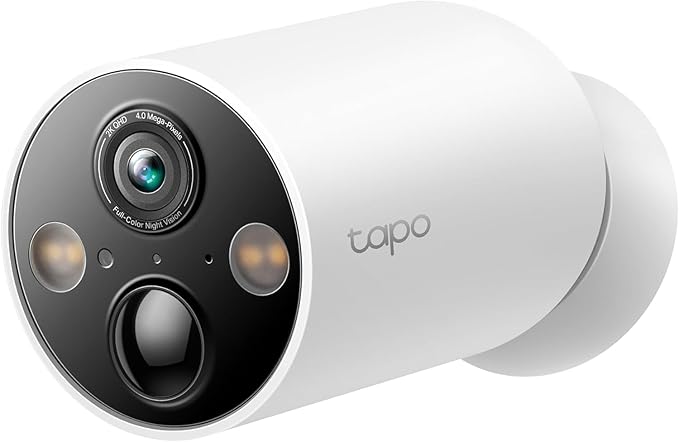
3. TP-Link Tapo C425

Type: Budget-Friendly AI Security Camera
AI Features: Smart motion tracking, person detection, activity zones, wire-free installation
Price: ~$55

Why It’s a Top Pick
The TP-Link Tapo C425 is one of the most affordable AI security cameras in 2025 — but it doesn’t cut corners. It offers smart motion tracking that follows movement across the frame, person detection to reduce false alerts, and a wire-free magnetic base that makes installation incredibly simple. It’s perfect for renters, small homes, or anyone looking for good AI on a budget.

What People Say
Users are impressed with how much tech is packed into this small camera. The app is easy to use, and motion tracking works well even in low light. Some mention the AI is slightly less refined than premium brands, but for the price, most agree it’s a smart buy.

Key Insights
✅ Pros ✔️ Smart motion tracking with person detection
✔️ Wire-free magnetic mount makes setup easy
✔️ Compact and discreet design
✔️ Great value for its AI features
⚠️ Cons ✘ AI accuracy slightly below premium models
✘ Limited advanced settings without TP-Link cloud plan
🔍 Ethical Insight Tapo offers privacy controls in the app, but users should check how recordings are stored and what is shared through their cloud service plan.
Explore TP-Link Tapo C425

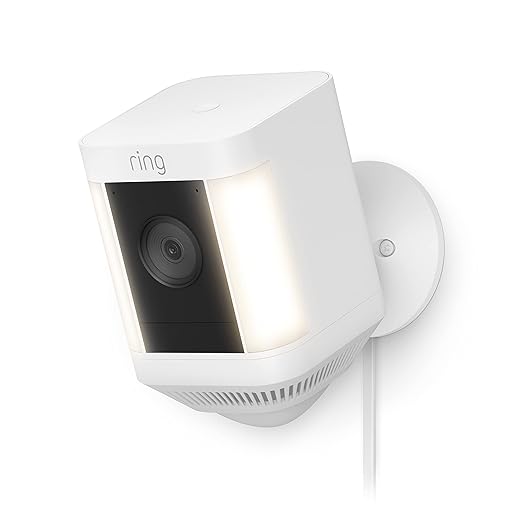
4. Ring Spotlight Cam Plus

Type: AI-Powered Outdoor Security Camera
AI Features: Advanced motion detection, customizable alert zones, real-time spotlight and siren, Alexa integration
Price: ~$149

Why It’s a Top Pick
The Ring Spotlight Cam Plus is a go-to for users who want both AI and physical deterrence in one device. With a powerful spotlight, two-way talk, and an AI system that sends real-time alerts based on customized zones, it works well in driveways, backyards, and near entry points. It’s also fully integrated with Amazon Alexa, making it ideal for homes already in that ecosystem.

What People Say
Users highlight the easy setup, strong night vision, and responsive mobile alerts. The combination of spotlight and siren offers real protection, not just monitoring. Some wish more features were available without a Ring Protect plan, but overall satisfaction is high.

Key Insights
✅ Pros ✔️ Built-in spotlight and siren for active deterrence
✔️ Accurate motion alerts with custom zones
✔️ Seamless Alexa integration
✔️ Two-way audio for live communication
⚠️ Cons ✘ Full features require Ring Protect subscription
✘ Heavier design than other models
🔍 Ethical Insight Ring has faced privacy concerns in the past. Users should regularly review video-sharing settings and device permissions within the Ring app.
Explore Ring Spotlight Cam Plus

4. How AI in Security Cameras Actually Works

When we say “AI security camera,” we’re not talking about a sci-fi robot watching your house. In 2025, AI in home security means your camera can understand what it sees, not just record video.
The real goal of modern AI security cameras is simple: fewer false alerts, faster responses, and smarter protection.

But how does this actually work?

Most modern AI security cameras combine advanced sensors, machine-learning models, and either local or cloud-based AI processing to detect patterns and decide when action is needed. Below is a clear breakdown of the core AI features that make these cameras truly smart — and worth the investment.

🧠 Smart Detection

Instead of alerting you every time a branch moves, AI-powered security cameras can:

  • Recognize humans, animals, and vehicles separately

  • Learn daily routines (like the mail carrier) and alert you only when something unusual happens

  • Use familiar face detection to reduce unnecessary notifications and false alarms

This is one of the biggest advantages of choosing a high-quality AI security camera over a basic motion camera.

🕵️ Activity Zones & Behavioral Analysis

With advanced AI security cameras, you can draw specific activity zones in the camera view — such as a front gate, driveway, or window — and let the AI focus only on those areas.

More advanced models can even detect:

  • Loitering behavior

  • People approaching from unusual angles

  • Delivery drop-offs vs. real intrusions

This level of behavioral analysis is where AI-powered home surveillance really starts to stand out.

☁️ Cloud-Based Intelligence vs. Local Processing

Some AI security cameras process AI directly on the device (faster and more private), while others rely on cloud-based AI servers (more powerful, but with potential privacy trade-offs).

That’s why it’s essential to read the privacy policy of any smart camera brand before buying. For example, Arlo’s privacy center clearly explains how video data is stored and who can access it — a detail many buyers overlook.

🎙️ Integration with Smart Assistants

Many modern AI security cameras integrate smoothly with Alexa, Google Assistant, and Apple HomeKit, allowing you to:

  • View live camera feeds on smart displays

  • Arm or disarm security using your voice

  • Trigger smart routines (for example, turning on lights when motion is detected)

This kind of integration turns an AI security camera into a true part of your smart home ecosystem.

5. What to Look for Before Buying an AI Security Camera

Not all AI security cameras are created equal — and with new models popping up constantly, it’s easy to get lost in technical jargon or marketing claims. Before clicking “Buy Now,” here are the key factors you should consider to avoid wasting money or compromising your privacy.

📷 1. AI Detection Accuracy

Look for cameras that clearly specify:

  • What they can detect (people, animals, vehicles)

  • Whether they offer familiar face recognition

  • If alerts can be customized to reduce false alarms

Tip: Features like activity zones and smart motion tracking help the AI perform better in real-world conditions.

🔋 2. Power and Placement

Decide whether you want a camera that’s:

  • Wired (more reliable, but needs an outlet)

  • Battery-powered (easier to install, but needs recharging)

  • Magnetic or weather-resistant (for flexible outdoor use)

Make sure your space supports the power option you choose — don’t assume they all work the same.

📱 3. App Experience & Compatibility

A good AI camera should come with a responsive, user-friendly app. Key things to look for:

  • Instant mobile alerts

  • Smart assistant integration (Alexa, Google, Siri)

  • Option to review and download footage easily

💡 Most users today prefer cameras that integrate with their broader smart home system. 

☁️ 4. Cloud Storage & Subscription Costs

Many features like familiar face recognition or extended video history are locked behind subscriptions (e.g., Nest Aware or Arlo Secure).
Before buying:

  • Check what’s included for free

  • Review monthly/annual plans

  • Consider local storage options (like SD cards or NAS)

🔐 5. Privacy and Data Protection

Some AI cameras record continuously or upload footage to the cloud. To stay in control:

  • Review the company’s privacy policy

  • Turn off unnecessary features (like audio recording) if you don’t need them

  • Choose a brand with a reputation for transparency (e.g. TP-Link’s privacy statement)
Illustration of AI security camera detecting people, tracking motion, and sending smart alerts (2025)

6. Behind the Algorithm – Can You Trust These Cameras?

AI security cameras promise peace of mind — but what’s the real cost of that peace?

In 2025, these devices are no longer passive observers. Modern AI security cameras actively make decisions: who to alert you about, what to ignore, and in some cases, who gets labeled as a “threat.”

That’s why it’s worth pausing for a moment to ask: how much control do we actually have over what these cameras see, store, and send?

🤖 It’s Not Just a Lens — It’s an Algorithm

Today’s AI security cameras rely on technologies like facial recognition, motion prediction, and behavioral analysis. Many of these systems are trained on massive datasets that may not fully reflect your environment — or your face.

This can sometimes lead to:

  • Misidentifications, especially for underrepresented groups

  • Over-monitoring of specific areas or people

  • A false sense of security if the AI fails to detect something important

Understanding how an AI-powered security camera makes decisions is just as important as its video quality.

☁️ The Cloud Sees More Than You Think

When footage from AI security cameras is stored in the cloud, it may be:

  • Accessible by the company

  • Analyzed to improve the algorithm

  • Shared with third parties under certain policies

Some brands have faced scrutiny for their cooperation with law enforcement, while others give users more control over how data is stored and managed. The key point is simple: you need to know where to look and what to check.

If you’re interested in transparency and open systems, our post on Open Source AI Models explains how visibility in AI training can help build long-term trust.

🔐 So, Can You Still Use Them Safely?

Absolutely — but only with informed choices.

To use AI security cameras responsibly, consider these practical steps:

  • Disable unnecessary features (like continuous recording or audio) when not needed

  • Review sharing and privacy settings regularly in the companion app

  • Favor brands that offer clear privacy dashboards and explanations

  • Choose local storage when possible, or opt for encrypted cloud plans

In short: AI security cameras can protect your home — but only if you know how to protect your data first.

7. Final Verdict – Should You Buy an AI Security Camera in 2025?

If you’re looking for smarter home protection in 2025, AI security cameras are no longer optional — they’re essential.

What separates these from traditional models isn’t just better resolution or mobile alerts. It’s the real-time intelligence they bring to your home: fewer false alarms, better context, and tighter integration with your smart ecosystem.

That said, not all cameras are created equal. Here’s how to choose:

• If you want Google Home integration and familiar face alerts, go with the Google Nest Cam (Battery)
• For top-tier performance and detection accuracy, the Arlo Pro 5S is a standout
• On a tighter budget? The TP-Link Tapo C425 packs smart features at a fraction of the cost
• Want active deterrents like lights and sirens? Choose the Ring Spotlight Cam Plus

Just remember:
• Check your app settings regularly
• Review what data is stored and how
• Use cameras that work for you — not just to watch you

8. FAQ – AI Security Cameras (2025)

Q: What is an AI security camera, and how is it different from a regular one?
A: An AI security camera uses artificial intelligence to recognize people, animals, vehicles, and behavior patterns. Unlike regular cameras that just record, AI models can send smarter alerts, reduce false positives, and even identify familiar faces.

Q: Do I need a subscription to use AI features on these cameras?
A: Many top models require a subscription (like Nest Aware or Arlo Secure) to unlock full AI features, such as cloud recording, facial recognition, or extended history. However, basic motion alerts and live streaming are usually available without one.

Q: Are AI security cameras safe from hackers?
A: Most reputable brands include encryption and two-factor authentication to protect your camera. Still, it’s essential to use strong passwords, update firmware regularly, and avoid default settings to reduce security risks.

Q: Can I use AI cameras without connecting them to the cloud?
A: Some models offer local storage via SD card or external drives, which helps minimize data exposure. However, features like face recognition and mobile access often require cloud connectivity. Always check the product’s storage options before buying.

Q: Which AI camera is best for outdoor use?
A: The Arlo Pro 5S and Ring Spotlight Cam Plus are both excellent for outdoor use. They’re weather-resistant, offer color night vision, and include features like real-time alerts and spotlights for added security.

Q: Are these cameras compatible with Alexa or Google Assistant?
A: Yes. Most modern AI cameras integrate with Alexa, Google Assistant, or even Apple HomeKit, allowing you to view live feeds, arm systems, or trigger routines with voice commands.

If this guide helped you understand how AI security cameras really work, these articles expand the picture and explore related areas where AI impacts our daily lives:

How Voice Assistants Actually Understand You
Avoid These Dark UI Tricks Used by Popular AI Apps
Why Everyone’s Talking About Open-Source AI Models

Reading them together helps build a clearer, more realistic understanding of how modern AI systems observe, decide, and interact with us — both inside and outside the home.